


An ESP32-based smart classroom energy management system that automatically controls lighting power modes using:
- Occupancy counting from dual IR sensors (entry/exit sequence detection)
- PIR motion sensing for presence-aware behavior at zero occupancy
- A web dashboard for live monitoring, control, overrides, logs, anomaly alerts, and mode-threshold configuration
This project is a functional proof-of-concept prototype demonstrating occupancy-based energy optimization. A production deployment would incorporate industrial-grade sensors rated for real-world environmental conditions including ambient light interference and larger detection ranges.
- Project Overview
- Core Features
- System Architecture
- Hardware Requirements
- Wiring and Circuit Diagram
- Software Stack
- Repository Structure
- Environment and Setup
- Build, Flash, and Monitor
- Web Dashboard Capabilities
- REST Endpoints
- Mode Logic and Threshold Rules
- Anomaly Detection and Alerts
- Simulation vs Hardware
- Known Limitations
- Demo Video
- Troubleshooting
- Future Improvements
- License
The system optimizes classroom lighting based on real-time room activity:
- IR1 and IR2 detect movement direction across the doorway to maintain an accurate occupancy count using sequence-based directional logic.
- PIR detects motion for edge cases where occupancy reads zero but physical presence exists in the room.
- Lighting modes switch automatically based on occupancy thresholds, or can be manually overridden via the web dashboard.
- Admin controls support full operational commands and live configuration from any browser on the same network.
- Real-time occupancy counting using directional IR sequence logic
- 4 lighting states: OFF, LOW, MED, HIGH
- Occupancy-aware automatic mode control
- Motion-aware LOW mode when occupancy is zero and PIR is active
- Manual override controls (OFF / LOW / MED / HIGH)
- PIR enable/disable control
- System ON/OFF toggle
- Occupancy reset and full system reset
- Event logging with uptime timestamps
- Anomaly detection: motion detected while occupancy is zero
- LCD alert for anomaly (shown for 5 seconds, then normal display resumes)
- Dashboard modal alert for anomaly with acknowledge action
- Admin-configurable occupancy thresholds for LOW, MED, HIGH from dashboard settings
- Controller: ESP32 (Arduino framework)
- Sensors:
- IR obstacle sensor pair for entry/exit direction detection
- PIR sensor for motion/presence validation
- Outputs:
- 16x2 I2C LCD for real-time status display
- 3 LEDs representing LOW / MED / HIGH lighting intensity
- Interface:
- Embedded HTTP web server hosted on ESP32
- HTML/CSS/JS dashboard served directly from SPIFFS filesystem
| Component | Specification | Quantity |
|---|---|---|
| ESP32 DevKit | DOIT DevKit V1 | 1 |
| IR obstacle sensor | 3-pin (OUT/GND/VCC), 3.3V compatible | 2 |
| PIR motion sensor | HC-SR501 or compatible, 5V | 1 |
| LCD display | 16x2 with I2C backpack, address 0x27 | 1 |
| LED | Any colour, 3mm or 5mm | 3 |
| Resistor | 220Ω current limiting for LEDs | 3 |
| Breadboard | Full size (830 point) | 2 |
| Jumper wires | M-F and M-M | As needed |
| Power supply | 5V USB (laptop, wall charger, or power bank) | 1 |
| Sensor Pin | ESP32 Connection | Notes |
|---|---|---|
| IR1 OUT | GPIO 4 | Entry side sensor signal |
| IR1 GND | GND rail | Common ground |
| IR1 VCC | 3.3V rail | 3.3V power — do NOT connect to 5V |
| IR2 OUT | GPIO 5 | Exit side sensor signal |
| IR2 GND | GND rail | Common ground |
| IR2 VCC | 3.3V rail | 3.3V power — do NOT connect to 5V |
GPIO 32 and GPIO 33 were tested but found unreliable on this board revision. GPIO 4 and GPIO 5 are used instead.
| Sensor Pin | ESP32 Connection | Notes |
|---|---|---|
| VCC | VIN (5V) | PIR requires 5V — do NOT use 3.3V |
| GND | GND rail | Common ground |
| OUT | GPIO 27 | Digital signal output |
PIR output signal is 3.3V compatible despite being powered at 5V. Safe to connect directly to ESP32 GPIO.
| LED | ESP32 Pin | Resistor | Represents |
|---|---|---|---|
| LED 1 | GPIO 25 | 220Ω to GND | LOW mode |
| LED 2 | GPIO 26 | 220Ω to GND | MED mode |
| LED 3 | GPIO 18 | 220Ω to GND | HIGH mode |
Connect LED anode (long leg) toward ESP32 signal pin. Connect cathode (short leg) through 220Ω resistor to GND.
| LCD Pin | ESP32 Connection | Notes |
|---|---|---|
| VCC | 3.3V rail | 3.3V power |
| GND | GND rail | Common ground |
| SDA | GPIO 21 | I2C data — default ESP32 SDA |
| SCL | GPIO 22 | I2C clock — default ESP32 SCL |
If LCD shows blank screen after powering on, adjust the contrast potentiometer on the back of the I2C backpack module using a small screwdriver.
ESP32 3.3V → breadboard 3.3V rails (powers IR sensors and LCD)
ESP32 VIN  → dedicated row     (powers PIR sensor only)
ESP32 GND  → breadboard GND rails (common ground for all components)
View and run the interactive circuit simulation here:
https://wokwi.com/projects/458998638421835777
The Wokwi simulation uses pushbuttons as substitutes for IR obstacle sensors, as Wokwi does not natively support IR obstacle sensor components. The GPIO pin assignments and firmware logic are otherwise identical between simulation and hardware.
| Component | Simulation (Wokwi) | Hardware |
|---|---|---|
| Entry detection | Pushbutton (GPIO 4) | IR obstacle sensor (GPIO 4) |
| Exit detection | Pushbutton (GPIO 5) | IR obstacle sensor (GPIO 5) |
| PIR motion | PIR sensor (GPIO 27) | PIR sensor (GPIO 27) |
| Display | LCD I2C | LCD I2C |
| Indicators | LEDs | LEDs |
- PlatformIO (build system and IDE)
- Arduino framework for ESP32
- LiquidCrystal_I2C library
- ArduinoJson library
- SPIFFS filesystem for dashboard hosting
- HTML / CSS / JavaScript (vanilla, no frameworks)
.
├── data/
│   └── dashboard.html          # Web dashboard (served from SPIFFS)
├── src/
│   ├── main.cpp                # Firmware logic, API routes, control loops
│   ├── credentials.h.example   # Wi-Fi credential template
│   └── credentials.h           # Your credentials (never commit this)
├── platformio.ini              # Board, framework, lib dependencies
└── README.md
- VS Code with PlatformIO extension or
- PlatformIO Core CLI installed
git clone https://github.com/Ravisankar-S/Occupancy-Based-Energy-Optimization.git
cd Occupancy-Based-Energy-Optimizationcp src/credentials.h.example src/credentials.hEdit src/credentials.h:
#define WIFI_SSID     "your_wifi_name_here"
#define WIFI_PASSWORD "your_wifi_password_here"
credentials.his listed in.gitignoreand will never be committed. Onlycredentials.h.exampleis tracked.
PlatformIO installs dependencies automatically from platformio.ini on first build:
marcoschwartz/LiquidCrystal_I2Cbblanchon/ArduinoJson
Run from project root. VS Code PlatformIO users can use the Project Tasks sidebar instead.
pio runpio run -t uploadpio run -t uploadfsMust be done at least once before the dashboard is accessible. Redo only if
dashboard.htmlchanges.
pio device monitor -b 115200pio run -t upload && pio device monitor -b 115200Check serial output for the assigned IP address, then open in any browser:
http://<ESP32_IP>

- Occupancy — real-time people count
- Power Mode — current mode with LED strip indicator and threshold summary. Settings icon opens threshold configuration modal
- Motion — PIR state (YES / NO / DISABLED)
- Control — AUTO / OVERRIDE / OFF state
- Override buttons: OFF / LOW / MED / HIGH
- Clear Override
- PIR enable/disable toggle
- Reset Occupancy
- System ON/OFF toggle
- Full System Reset
Opened from the settings icon on the Power Mode card:
- Set occupancy threshold for LOW, MED, HIGH modes
- Validation enforces LOW < MED < HIGH
- Changes apply to ESP32 immediately on save
- Mobile-friendly layout
Reverse chronological timestamped log of:
- ENTRY / EXIT events
- PIR triggers
- Mode and override changes
- System actions
- Anomaly alerts
Appears when motion is detected while occupancy is zero. Includes timestamp and acknowledge button. Also dismissible via Escape key or clicking outside the modal.
| Endpoint | Description |
|---|---|
/ |
Dashboard HTML |
/status |
Live system state JSON |
/log |
Recent event log JSON |
| Endpoint | Description |
|---|---|
/override?mode=0|1|2|3 |
Force lighting mode |
/override/clear |
Return to auto mode |
/pir/toggle |
Enable or disable PIR |
/occ/reset |
Reset occupancy to 0 |
/system/toggle |
Toggle system ON/OFF |
/reset |
Full system reset |
/settings/mode-thresholds?low=<n>&med=<n>&high=<n> |
Update mode thresholds |
| PIR State | Mode |
|---|---|
| Motion detected | LOW (for 5 seconds after last trigger) |
| No motion | OFF |
Thresholds are configurable from the dashboard. Defaults:
| Occupancy Range | Mode |
|---|---|
| 1 – 2 | LOW |
| 3 – 4 | MED |
| 5+ | HIGH |
When PIR detects motion while occupancy is zero:
- Event logged with timestamp
- LCD displays
!! UNTRACKED !!/Presence Alert!for 5 seconds - Dashboard shows anomaly modal with acknowledge option
- A 10-second arming delay after boot and reset prevents false alerts during startup
- IR obstacle sensors are susceptible to interference from direct sunlight due to ambient infrared radiation. Sensors should be positioned away from windows and direct sunlight in deployment.
- PIR sensor may trigger erratically near windows, AC vents, or other heat sources.
- Occupancy thresholds reset to firmware defaults on power cycle. Persistent threshold storage via NVS is a planned improvement.
- IR counting assumes single-file entry and exit. Two people passing simultaneously may cause a miscount.
- System assumes a single controlled entry point per room.
Watch the full system demo here:
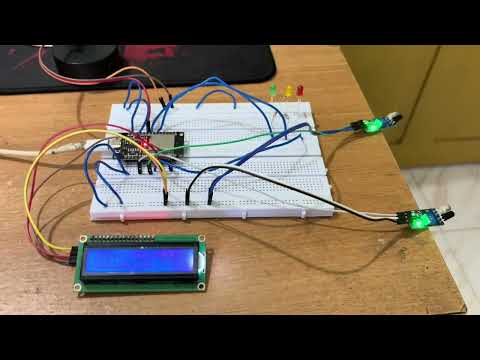
The demo video was recorded before the admin-configurable occupancy threshold feature was added. All other features shown are present in the current codebase.
| Problem | Solution |
|---|---|
| Dashboard not loading | Run pio run -t uploadfs to upload SPIFFS filesystem |
| WiFi not connecting | Verify src/credentials.h values are correct |
| LCD blank on boot | Adjust contrast potentiometer on I2C backpack |
| LEDs not lighting | Check LED polarity — long leg toward signal pin |
| IR sensors not triggering | Adjust sensitivity potentiometer on sensor module. Avoid direct sunlight |
| PIR always HIGH on boot | Normal — PIR has a 30–60 second warm-up period |
| IP address unknown | Open serial monitor at 115200 baud to read assigned IP |
| Occupancy phantom triggers | Ensure IR OUT pins use INPUT_PULLUP mode in firmware |
- Replace IR obstacle sensors with industrial IR break-beam sensors for reliable detection in ambient light conditions
- Upgrade PIR to a wide-angle ceiling-mount sensor rated for larger classroom spaces
- Add current sensor (ACS712) on the lighting load to measure actual power consumption and validate energy savings quantitatively
- Integrate a real relay module to control actual lighting circuits instead of indicator LEDs
- Persist mode thresholds across reboots using ESP32 NVS (Non-Volatile Storage) or Preferences library
- OTA (Over-The-Air) firmware updates so devices can be updated without physical access
- Watchdog timer implementation to auto-recover from firmware hangs
- Scheduled daily occupancy reset at midnight to correct any count drift
- Multi-entry point support for classrooms with more than one door
- Password-protected dashboard with admin authentication
- Historical occupancy and mode data graphing over time
- CSV or JSON export of event logs for external analysis
- MQTT integration to publish sensor data to a central broker
- Multi-room support — each classroom as a node reporting to a unified building dashboard
- Mobile push notifications for anomaly alerts via a companion app or webhook
- PCB design to replace breadboard prototype for reliable long-term installation
- 3D printed enclosure for sensor and controller housing
- Power consumption analysis and energy savings report generation
- Integration with existing Building Management Systems (BMS)
This project is licensed under the terms of the LICENSE file in this repository.
made with ❤ by Ravi