Generate project-tailored AI assistant rules & skills in minutes.
Payo interviews you about your stack, then writes the guidance files your AI coding assistant reads — so Claude, Cursor, Copilot, and friends follow your project's conventions instead of guessing.




- What is Payo?
- Why Payo?
- How Payo differs from a generic skills pack
- Who is this for?
- Quick Start
- How to use — a walkthrough
- Already have a project? Payo detects your stack
- What gets generated
- What it asks about
- AI vs. template generation
- Bootstrap prompt
- Resume anytime
- Roadmap
- Requirements
- Run locally
- Contributing
- License
AI coding assistants are only as good as the context they're given. Payo is an interactive CLI that interviews you about your project — language, framework, database, auth, testing, conventions — and then generates the guidance files your assistant actually reads.
It supports Claude, Cursor, GitHub Copilot, Codex, Windsurf, Zed, and Antigravity. Where the assistant ships a headless CLI, Payo drives that tool's own AI to write rich, project-specific docs; where it doesn't, Payo falls back to solid templates — so you always end up with usable output.
And for those wondering what Payo means, in Gujarati it means foundation — what a building or project is built on.
Every AI coding session starts cold. Your assistant doesn't know you use Drizzle
over Prisma, that handlers live in src/routes, that you write Vitest specs
beside the file, or that commits follow Conventional Commits. So you re-explain
it — in chat after chat — and still get code that ignores half of it.
The fix is the guidance files agents read — an AGENTS.md entrypoint plus
Agent Skills under .agents/skills/. But writing them
by hand is tedious and easy to get wrong. Most people never do it, or do it once
and let it rot.
Payo writes them for you in minutes — tailored to your actual stack, in one universal layout that every skills-compatible tool reads (Claude Code, Codex, Cursor, Copilot, Gemini, Antigravity, Windsurf, Zed, …) — so your assistant follows your conventions from the first prompt instead of guessing.
Vibe coding is fast and fun — you prompt, the AI improvises, code appears. The problem isn't the speed, it's that the assistant has no rules to improvise within. So it guesses: a different ORM than the rest of the repo, files scattered wherever, its own naming, your tests and commit conventions skipped. Fine for a throwaway demo; on a real codebase it quietly piles up inconsistency you pay for later in reviews, bugs, and refactors — and each new chat starts the guessing over.
Payo gives that improvisation a guardrail. It generates the guidance files your assistant already reads, so the AI reaches for your framework, your folder layout, your testing and git rules every time — without you stopping to explain them. You keep vibe coding at full speed; the output just fits the project instead of fighting it.
There are plenty of ways to get skills and rule files into a repo: curated collections, awesome-lists, starter templates, a rules pack someone published. They all hand you the same markdown everyone else gets — written for a generic project, then left for you to adapt. Payo isn't a catalog you install. It's a generator that writes your skills, from your repo.
1. Your skills are written, not downloaded. Payo doesn't ship skill content.
It runs the agent CLI you already have installed and authenticated — claude,
codex, cursor-agent, copilot, agy — over your answers, several skills at
a time, retrying and logging each attempt. The result is authored for this
project on this machine, under your account.
2. Only the skills your project needs exist at all. Every skill is gated on
your answers: no database means there is no data-layer/ skill — not a stub, not
an "N/A" section, no directory. Same for auth, state management, API
conventions, logging, testing. A pack gives you all of them and expects you to
delete the two-thirds that don't apply; Payo never creates them. The interview
works the same way: a bank of 200+ stack-tailored questions across 100+
tech modules, from which you're asked only the handful your stack pulls in.
Payo also shows you the computed list before writing anything, so you can
uncheck any skill you don't want a file for.
3. Real commands and real paths, not placeholders. Because Payo knows your
package manager, framework, and ORM, the guidance says pnpm exec eslint . —
not npx eslint ., and not <your lint command>. It says cargo test, php artisan migrate, bin/rails db:migrate, and lists your monorepo's actual
package directories. The generation prompt explicitly forbids guidance for any
tool that isn't in your stack, so nothing generic leaks back in.
4. It reads your repo, including habits you never wrote down. On an existing
project, Payo detects your stack from the manifests and infers your
branch-naming and commit-message conventions by parsing your local git
history (which never enters an AI prompt). In Detect everything mode your
code is the source of truth: anything Payo can't find is skipped, not filled
with a plausible default — so it won't prescribe /v1 API versioning, a testing
setup, or a folder layout your project never adopted.
5. Guidance that's enforced, not just suggested. A skills pack is prose, and an agent can skip prose. When you enable a guardrail, Payo also writes the mechanism that makes it fire: a git hook — in the runner you pick — that hard-blocks the commit or push, and a native pre-tool gate for Claude, Cursor, Copilot, Codex, and Antigravity. It plans both layers together, so each check runs in exactly one place — the agent is told not to re-run what a hook already runs.
6. One canonical copy, every tool. One SKILL.md per topic under
.agents/skills/, with Claude Code and Windsurf pointed at it by symlink. No
per-tool duplicates to edit twice and no copies to drift apart — which is
exactly what a multi-format rules pack leaves you maintaining.
7. Re-runnable, and nothing leaves your machine. Re-running Payo doesn't
duplicate a hook or clobber your config: hook edits are matched per check, native
gates upsert, and retired files are cleaned up on your say-so. An interrupted run
resumes from .payo/. There's no Payo backend, no account, and no telemetry —
without an agent CLI installed, nothing leaves your machine at all.
- Devs starting a new repo who want their AI assistant productive from commit #1, not after a dozen "actually, we do it this way" corrections.
- Teams enforcing conventions who need every contributor's assistant to follow the same folder structure, naming, testing, and git rules.
- Multi-tool users who switch between Claude, Cursor, and Copilot and want the same project guidance in one universal layout every tool reads.
- Anyone bootstrapping a stack they haven't wired up before — Payo encodes sensible, framework-specific defaults and can scaffold a runnable project.
If you've ever pasted the same "here's how this project works" preamble into a chat for the third time, Payo is for you.
macOS / Linux (and Windows via Git Bash or WSL):
curl -fsSL https://payo.uttamgelot.com/install.sh | shWindows (PowerShell):
irm https://payo.uttamgelot.com/install.ps1 | iexThen run payo in any project directory.
The installer needs no Node.js. If you already have bun or Node >= 20.12
it installs the npm package (a much smaller download you can update with tools
you already know); otherwise it downloads a standalone binary. Set
PAYO_INSTALL_METHOD=binary to always get the binary. Re-running the installer
upgrades in place and cleans up the older copy.
Already have Node? You can skip the installer
npx @uge/payo
# or
bunx @uge/payo
Or install it globally with npm i -g @uge/payo / bun add -g @uge/payo.
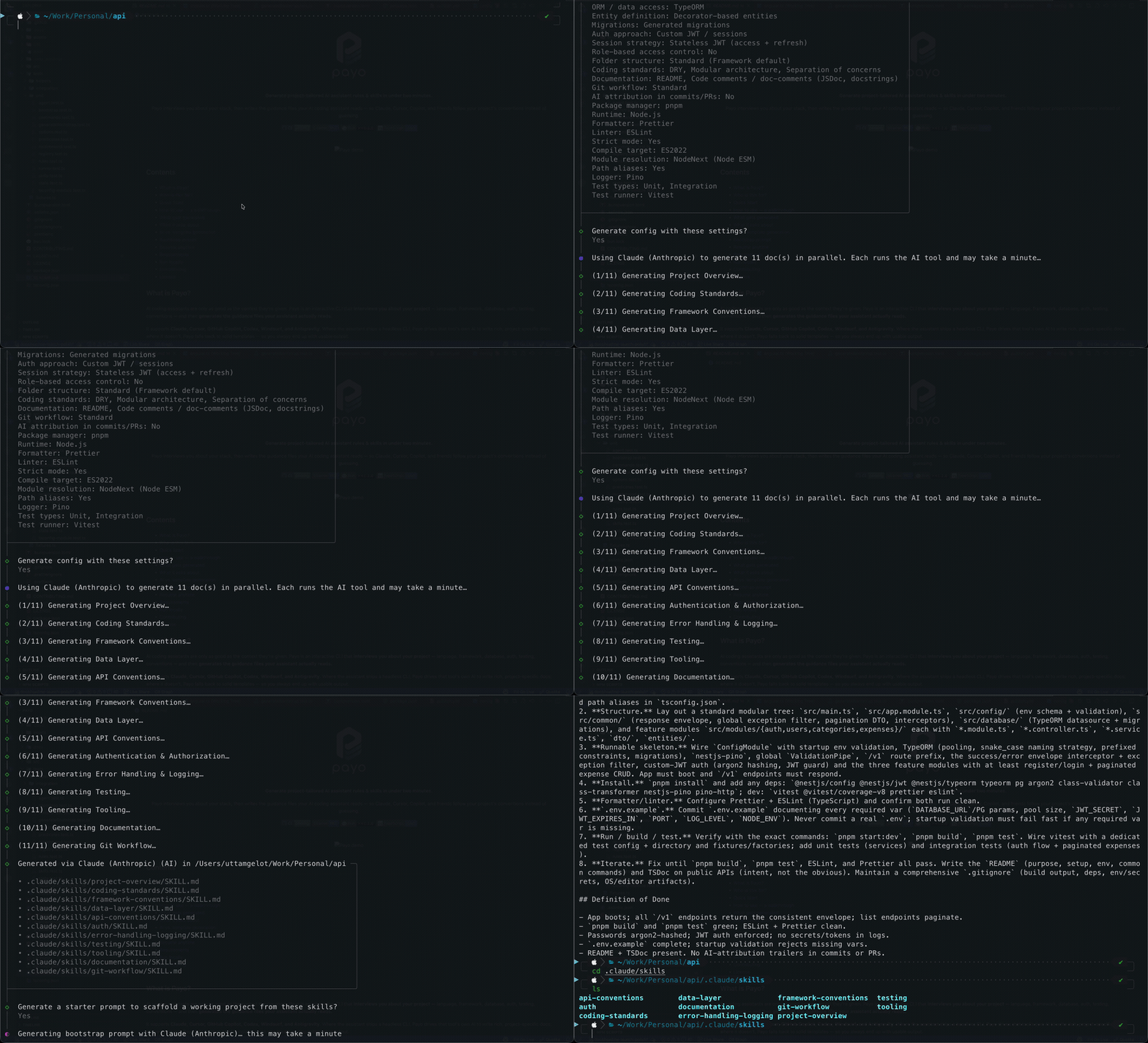
Answer a short questionnaire about your stack, and Payo drops tailored AI guidance files straight into your repo.
- Run Payo from your project root.
payo— it writes into the current directory, socdinto the repo first. - Existing repo? It's auto-detected. If Payo finds a manifest, it reads your stack and pre-fills the questionnaire, so most stack questions become a quick confirm-and-skip instead of typing. See Already have a project?.
- Answer the questionnaire. Pick your AI tool, project type, language, framework, and so on. Questions adapt to your answers — choose Next.js and you get Next.js-specific follow-ups; choose Postgres and you're asked about migrations and naming. Most prompts ship a recommended default, so you can blast through with Enter.
- Review your stack — and edit inline. Before writing anything, Payo shows a summary of every answer. Choose Edit an answer to change any response — or re-open a section you skipped — right from the review; dependent questions are re-asked automatically. Pick Generate when it looks right.
- Pick which skills to generate. Payo shows the exact list of skills your answers produced — every one preselected — so you can uncheck anything you don't want a file for before a single one is written. Skipped when there's only zero or one skill to decide between.
- Payo generates the guidance. It writes one universal layout that every skills-compatible tool reads (see the table below). With an agent CLI installed, skills are generated in parallel by the AI; otherwise solid templates are used.
- (Optional) Get a bootstrap prompt. Payo offers to write a paste-ready
bootstrap-prompt.mdyou hand to any LLM to scaffold a runnable project that honors the guidance it just generated. - Interrupted? Just rerun. Progress lives under
.payo/; Payo resumes and only generates what's missing.
Payo isn't just for empty repos. Run it in an established project and it reads
what's already there — package.json, pyproject.toml, go.mod, Cargo.toml,
composer.json, *.csproj, pom.xml, build.gradle, Gemfile, lockfiles, tool configs, and the folder layout — to figure out
your stack across TypeScript/JavaScript, Python, Go, Rust, PHP, C#, Java, and Ruby, then pre-fills the questionnaire
from that evidence. You confirm or tweak instead of typing it all out.
When detection finds a manifest, you get two quick choices:
- Work with the existing project, or start fresh? Keep the detected answers, or ignore them and answer from scratch.
- Detect everything, or just the stack?
- Detect everything treats your code, folder structure, and git history as
the source of truth. It records exactly what it finds — stack, conventions,
and your branch-naming / commit-message style read from recent git history — and
skips anything it can't find: no skill is created for it and it isn't
mentioned. The only things applied without detection are a few safe assistant
policies (no AI attribution in commits, task-scoped atomic commits, confirm
before push, verify before push, gitleaks secret scan before push, confirm
before destructive SQL / migrations, work from
.env.example, and DRY/modular coding standards) — all shown up front and editable on the review screen. You land straight on that review screen and confirm once. - Just the high-level stack fills in the stack facts only and interviews you for the convention questions (folder structure and the like).
- Detect everything treats your code, folder structure, and git history as
the source of truth. It records exactly what it finds — stack, conventions,
and your branch-naming / commit-message style read from recent git history — and
skips anything it can't find: no skill is created for it and it isn't
mentioned. The only things applied without detection are a few safe assistant
policies (no AI attribution in commits, task-scoped atomic commits, confirm
before push, verify before push, gitleaks secret scan before push, confirm
before destructive SQL / migrations, work from
How detected answers are applied in Just the high-level stack mode:
- Stack facts (language, framework, database, ORM, package manager, test runner, linter…) are filled in and skipped — they're things a manifest can state authoritatively, so there's nothing to ask.
- Conventions and preferences are left to the interview — a manifest can't encode intent, so Payo asks rather than guessing.
Monorepos are detected too: Payo enumerates workspace members (pnpm / npm /
yarn / lerna, Cargo, go.work, Maven / Gradle), detects each package's stack, and
uses the real app stack as the primary answers — merged with the root's repo-level
tooling (package manager, runtime, formatter, test runner), which in a hoisted
monorepo lives at the root, not in the member. It also finds nested workspaces
the root never declared (a Cargo [workspace] under services/, a nested
go.work) and undeclared sibling packages. The generated guidance gains a
Workspace Packages list and monorepo conventions.
Hybrid / polyglot repos are understood as one project: a React frontend next
to a Rust backend is classified full-stack, the extra languages show up as
Additional languages (with the dirs that carry them) in the generated Tech
Stack and in the detection summary, and root package.json scripts (cargo build, a dedicated e2e config) act as extra evidence for stacks the manifests
hide.
Detection runs deterministically from your files first. Branch-naming and
commit-message conventions are inferred by parsing your local git history on
your machine — that history is never placed in any AI prompt. When the chosen AI
tool's CLI is installed, an optional second pass uses your own assistant to
fill gaps on unusual stacks — it reads the project manifests, the directory
listing, and short excerpts of your project docs (README.md, CLAUDE.md,
AGENTS.md, docs/*.md), runs under your own account, and never sends anything
to a Payo server (see Your data stays yours). It never
overrides what the deterministic pass found — if the docs clearly contradict a
detected answer, Payo surfaces the conflict and lets you arbitrate. If no CLI is
present, the deterministic result stands on its own.
One universal layout, whichever agent CLI you pick — no per-tool formats:
| Path | What it is |
|---|---|
AGENTS.md |
The entrypoint most tools read natively — your project's base rules |
.agents/skills/<id>/SKILL.md |
One Agent Skill per topic, spec frontmatter |
CLAUDE.md |
A one-line @AGENTS.md import shim so Claude Code picks it up |
.claude/skills/** |
Symlinks into .agents/skills/ (dir copy on Windows) for Claude Code |
.windsurf/skills/** |
The same shim for Windsurf |
Who reads what, with no extra work:
- Codex, Cursor, Copilot, Gemini CLI, Antigravity, Zed, Devin →
.agents/skills/andAGENTS.mdnatively. - Claude Code → the
CLAUDE.mdshim plus the.claude/skills/symlinks (officially supported; it dedupes if it also reads the target directly). - Windsurf →
AGENTS.mdplus the.windsurf/skills/shim.
Zed users: Zed reads only the first instruction file it finds, in the order
.rules,.cursorrules,.windsurfrules,.clinerules,.github/copilot-instructions.md,AGENT.md,AGENTS.md. If your repo holds any of the files aboveAGENTS.md, Zed ignores everything Payo generated — so Payo warns you at the end of a run and leaves the file for you to remove or merge.
AGENTS.md opens its skills index with a directive telling the agent to consult and
follow the applicable skills before writing code — so the guidance is used, not just
present.
Optionally, Payo adds a change-audit skill (.agents/skills/change-audit/SKILL.md):
if you opt in, it asks when to run — before every commit or before pushing — and the
agent uses it at that point to check your pending change against the relevant project
skills and flag anything that conflicts. It reads the diff and reports — it never runs
your tests, linter or formatter, because your git hook already does.
Skills are guidance the assistant should follow — but an agent can skip prose. So when you enable a guardrail, Payo also writes the hook that makes it fire regardless:
-
A git hook (mechanical, hard block). When you turn on the gitleaks scan or the verify-before-commit/push step, Payo asks which runner should carry the checks — Lefthook, Husky, pre-commit, plain
.githooks/scripts, or none at all — and writes that runner's config runninggitleaks, your test command, your linter and a format check at the stage you chose, blocking the commit/push on failure — for every tool, and for a human typinggit. No option is marked "recommended": which runner your team wants is a convention, not something Payo should decide. Payo writes the config and tells you the one command that activates it —lefthook install,npx husky,pre-commit install, orgit config core.hooksPath .githooks— and installs nothing itself.If your repo already has hooks — lefthook, husky, pre-commit, simple-git-hooks or native
.git/hooks— Payo reads what each stage already runs and, by default, leaves your setup completely untouched. Anything it already covers is simply never added; for anything missing, Payo asks whether to append it or leave the file alone, and leaving it alone is the recommended answer. -
A native tool hook. For Claude, Cursor, Copilot, Codex, and Antigravity, Payo writes a pre-tool hook that fires when the agent runs
git commit/git pushor a destructive query. Confirm-push and DB-safety raise a confirm prompt for you. Change-audit instead denies the command with an instruction back to the agent — a confirm prompt would just be approved and the audit skipped — and the gate stays shut until the change-audit skill records a pass for that exact change. The receipt it writes lives inside.git/, so it is never committed, and a later commit moves the key it is stamped with, re-closing the gate. It stores nothing outside.git/and runs no model. Codex needs one one-time/hookstrust step, which Payo prints. Tools with no usable pre-tool gate (Windsurf, Zed) are covered by the git hook above.
Both are idempotent — re-running Payo never duplicates a hook — and are written only for the guardrails you actually enabled. Whatever a hook runs, the generated skills tell the agent not to run it as well, so the same checks never execute twice; anything no hook covers stays an explicit instruction to the agent.
The question Payo asks — "Which agent CLI should Payo use to generate content?" — picks only which installed CLI authors the content. The output above works with every skills-compatible tool regardless of that choice.
Rich AI generation needs an agent CLI on your
PATH. Without one, Payo writes well-structured template defaults into the same layout instead.Regenerating over an older Payo project? It offers to remove the retired per-tool files (
.cursorrules,.windsurfrules,.cursor/rules/**,.github/instructions/**,.github/copilot-instructions.md,AI_RULES.md).
Payo understands 30 frameworks, 29 ORMs, and 17 databases across TypeScript/JavaScript, Python, Go, Rust, PHP, C#, Java, and Ruby — backed by a bank of 200+ stack-tailored questions it draws from, asking only the handful your stack needs. Dimensions covered:
- Project — type (frontend / backend / full-stack / CLI / script) and a short description
- Language & framework — plus framework-specific conventions
- API — REST, GraphQL, gRPC, tRPC
- Frontend — styling and state management, with provider-specific conventions for Tailwind, shadcn/ui, and CSS Modules
- Data — database and ORM/data-layer, with naming & migration conventions, plus a guardrail requiring confirmation before destructive SQL or migrations
- Auth — approach, session strategy, RBAC, plus provider-specific conventions for Clerk, Auth.js, Better Auth, and Supabase Auth
- Validation & logging — stack-appropriate libraries
- Testing — unit / integration / component / E2E and runners
- Tooling — package manager, runtime, formatter, linter
- TypeScript —
tsconfigstrictness, target, module resolution, path aliases - Conventions — folder structure, coding standards, docs, git workflow, branch-naming / commit-message style (inferred from local git history), and an option to add a gitleaks secret-scan convention (scan for leaked secrets before every push)
- Change audit (optional) — opt into a skill that checks your pending change against the project skills before commit or push
Payo always leaves you with output. When the chosen assistant's headless CLI is installed, it generates each guidance file in parallel from your answers — richer and more specific. When the CLI is missing, or every run fails, it falls back to static templates.
A few environment variables tune AI generation:
| Variable | Default | Purpose |
|---|---|---|
PAYO_CONCURRENCY |
4 |
Max parallel agent subprocesses |
PAYO_RETRIES |
1 |
Extra attempts after a failed run |
PAYO_AGENT_TIMEOUT_MS |
420000 |
Wall-clock cap per file (ms) |
Payo has no backend and no telemetry. Rich generation runs entirely through the
AI CLI you already have installed (claude, cursor-agent, etc.), so your
answers go only to that tool under your own account and credentials — exactly as
if you'd prompted it yourself. Payo itself sends nothing to any server; without a
CLI present it never leaves your machine at all, falling back to local templates.
An empty repo with great guidance is still an empty repo. After generating, Payo
offers to write a bootstrap-prompt.md — a paste-ready prompt that tells any
LLM to scaffold a runnable project using the stack's official tooling (the
framework's own create command / CLI), honor the generated conventions, and
iterate with you until it runs.
Interrupt a run and pick up where you left off. Payo saves your questionnaire
answers and generation progress under .payo/; rerun and it resumes, only
generating what's missing. Finished runs clean the directory up automatically.
Payo works today, but it's still early. Here's where it's headed:
- Deeper monorepo support. Payo now enumerates workspace members — including nested workspaces the root never declared — detects each package's stack, classifies hybrid repos (frontend + backend languages) as one full-stack project, and writes per-package notes into one root config (see Already have a project?). Next is going further: per-package skills and guidance for repos where each workspace wants its own conventions, and workspace enumeration for the remaining ecosystems (Python, PHP, .NET, Ruby).
- Broader stack coverage. More languages, frameworks, ORMs, databases, and AI tools, plus deeper, more opinionated defaults for the ones already supported — so the guidance fits more of the ecosystem out of the box.
- A smoother flow. Faster, clearer prompts; better defaults and grouping; tighter summaries and confirmations; and a generation step that's quicker and more transparent about what it's doing.
Have a stack you want supported or an idea to make the flow better? Open an issue or see Contributing.
To run Payo: nothing. The standalone binary from
the installer is self-contained — no Node, no Bun. git is used
if present (to detect your repo) but is not required.
Via npm instead: Node.js >= 20.12 for
npx @uge/payo. Bun is optional — bunx @uge/payo works, but is never
required to use Payo.
Supported by the binary: macOS (Apple Silicon and Intel), Linux (x64 and arm64, glibc) and Windows x64. On Alpine/musl or Windows on ARM the installer tells you to use npm instead.
To develop Payo: Bun >= 1.1.0 (the project builds, tests, and runs from source with Bun — see Run locally).
Payo writes nothing outside the project you run it in, so removing the CLI is all there is to it:
rm ~/.local/bin/payo      # standalone binary
npm rm -g @uge/payo       # npm install
bun remove -g @uge/payo   # bun install
The installer prints which of the three it used.
macOS: binaries fetched by the installer run fine. If you instead download an archive from the Releases page in a browser, macOS quarantines it — clear that with
xattr -d com.apple.quarantine payo.
Hacking on Payo or running it from source:
git clone https://github.com/uttam-gelot/payo.git
cd payo
bun install        # Bun >= 1.1.0
bun run dev        # runs src/index.ts directly
Other useful scripts:
bun test           # run the test suite
bun run typecheck  # tsc --noEmit
bun run lint       # eslint
bun run build # bundle to dist/ (Node target)Contributions are welcome — new frameworks, ORMs, AI tools, and fixes. See CONTRIBUTING.md for setup, the project layout, how to add a stack module, and the pre-PR checklist.